Staff App Chat
Stop switching between email, group texts, and multiple apps. Staff App Chat puts all your team communication in one reliable place with notifications, threaded replies, and other messaging features your team deserves.
.svg)
.svg)

Keep your team connected without the headaches
Running a gym means coordinating schedules, sharing updates, and keeping everyone on the same page. But when your chat app is unreliable, you end up juggling group texts, emails, and frustrated staff members. We've solved that problem.

Chat, where your staff already works
Organize staff communication with reliable chat within the Staff App — no more switching between platforms, lost messages, endless emails, or chasing down coaches. Simplify sub requests, schedule changes, and more in one place.

Modern messaging your staff will love
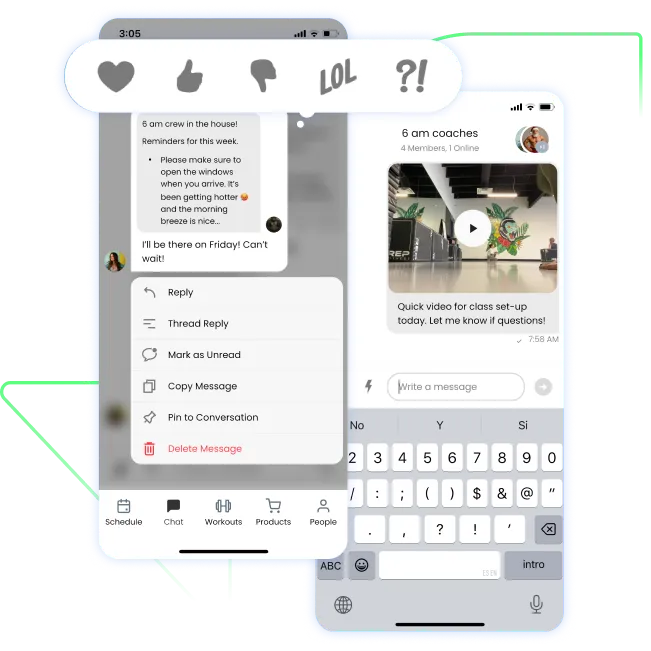
Threaded replies keep conversations organized. Emoji reactions let your team respond quickly. Read receipts show who's seen important updates. Pinned messages ensure nothing gets lost.

Lightning-fast performance
Messages load in under 1.5 seconds, and the entire app runs smoothly across all devices.
Our coach just showed me this... Will be replacing Slack now.
Everything you need to know about Staff App Chat
How does Staff App Chat help my gym?
Staff App Chat simplifies communication by eliminating the need for email chains, group texts, or third-party apps. It keeps all gym-related conversations in one place, making it easy to coordinate schedules, handle sub requests, share announcements, and keep your team on the same page.
What features does Staff App Chat include?
- Direct messaging: One-on-one conversations between team members
- Group chats: Create group conversations for specific topics or teams
- Threaded replies: Keep discussions organized by replying directly to specific messages
- Emoji reactions: Acknowledge messages quickly without cluttering the chat
- Read receipts: See when team members view your messages
- Pinned messages: Highlight important updates so they don’t get lost
- Fast loading: Messages load within 1.5 seconds
Is Staff App Chat secure?
Absolutely. Staff App Chat is private and secure. All communications stay within your gym’s PushPress environment and are not accessible to outside parties.
Who can access Staff App Chat?
Anyone with access to your gym’s Staff App can use Chat. Permissions are managed through the same staff account system you already use for scheduling and other functions.
Can I share images or files through Staff App Chat?
Yes! Share images, workout templates, schedules, or other documents directly in conversations to keep your team informed and organized.
How will Staff App Chat reduce my administrative workload?
By centralizing staff communication, you’ll save time tracking conversations across multiple platforms. Shift swaps, announcements, and updates are handled efficiently in one system, cutting down on redundant messages and follow-ups.
Will my staff need training to use Staff App Chat?
Nope! Staff App Chat is intuitive and familiar to anyone who has used modern messaging apps. Your team can jump in and start using it right away with little to no training.
How is Staff App Chat different from regular texting or WhatsApp groups?
Unlike consumer apps, Staff App Chat is integrated directly with your gym’s management system. Conversations happen in the same place where your team manages schedules, client info, and daily tasks—no app switching required. Plus, it includes gym-specific features designed for professional communication.
Does Staff App Chat work on iOS and Android?
Yes! Staff App Chat works seamlessly across iOS, Android, and web browsers, so your team can stay connected no matter what device they use.
See more features
Experience reliable team communication today
Stop dealing with unreliable messaging that slows down your gym operations. Give your team the communication tools they deserve.
.webp)