Kicksite Pricing 2026: New Tiers, Processing Fees & Real Cost

Published
· Updated
TL;DR
- Kicksite charges by active students: $49/month for 0–25, $99 for 26–50, $149 for 51–100 and $199 for 101+, with every feature at every tier.
- Going from 50 to 51 students moves you from $99 to $149 a month, a 50% jump.
- US card processing adds $29/month (or $49 plus a $35 setup fee with ACH) on top of 2.9% + 25¢ per charge. It's on Kicksite's payment processing page, not its pricing page.
- Kicksite's strengths: ease of use, highly rated support and a long track record in martial arts.
Kicksite's pricing page promises "simple, transparent pricing." The four tiers are simple. What they'll cost you depends on a number the page can't show: how many students you'll have next year.
Here's where I land: your software bill shouldn't be a penalty for growing. Under Kicksite's tiers, the month your school signs its 51st student, your bill goes from $99 to $149. And the tier price isn't even the biggest number in your software costs. Processing is.
I've owned gyms for 12 years and worked with hundreds of martial arts academy owners on their software. Kicksite comes up constantly, and lately the conversation has turned to price. If you're looking at a renewal and deciding whether to absorb an increase or deal with a switch, this is the math to do first.
Full disclosure: I work at PushPress, which competes with Kicksite. Kicksite does a lot right, and I'll say so.
What Is Kicksite?
Kicksite is martial arts school management software that combines belt rank tracking, attendance, recurring billing, and email and text messaging in one platform. Kicksite says it has served martial arts schools for more than 18 years and is used by over 2,100 schools in 23 countries. Pricing is based on how many active students you have.
How Much Does Kicksite Cost in 2026?
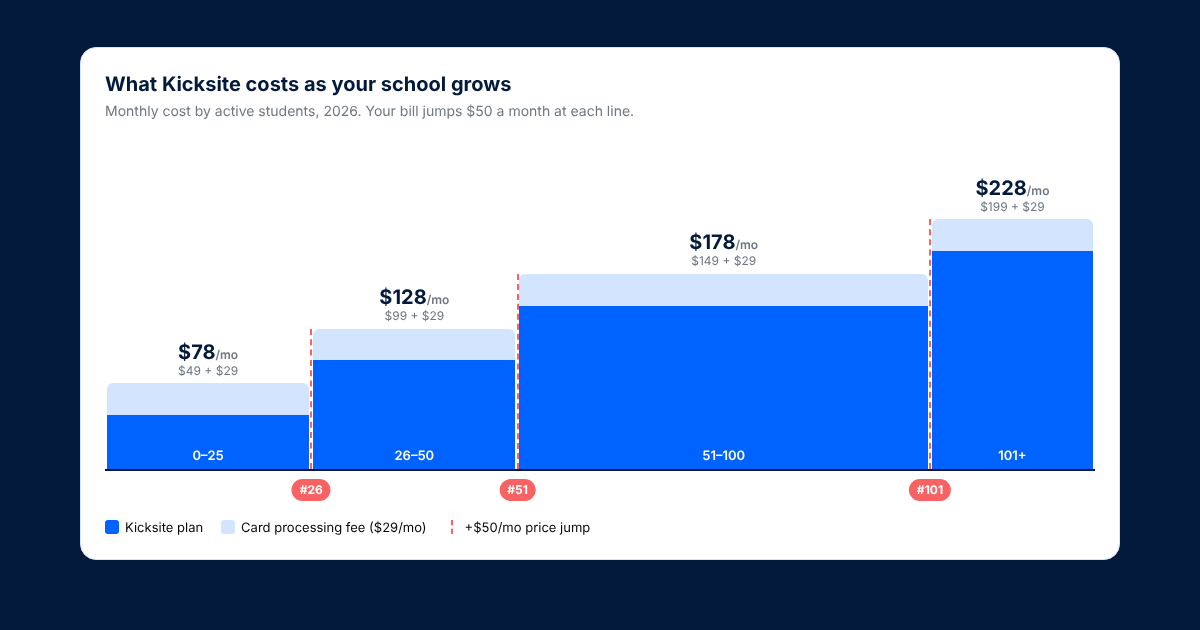
Kicksite costs $49 to $199 per month in 2026, depending on how many active students you have. US schools that process cards through Kicksite add $29 a month, so the real monthly cost runs $78 to $228 before per-charge fees.
Every tier includes every feature, so you're never paying extra to unlock rank tracking or texting. Kicksite also says it offers discounted annual pricing, but you have to ask for it when you book a demo. New schools get their first 30 days free. (Source: Kicksite pricing.)
Did Kicksite Raise Its Prices?
Yes. In spring 2026, Kicksite moved to the four tiers on its pricing page today. Under the old structure, $99 a month covered schools with up to 100 students. Now $99 covers 26–50 students, and schools with 51–100 students pay $149.
New schools sign up on the new pricing. Existing customers are a different story: owners we've talked to this fall say Kicksite is moving them from older plans onto the new tiers.
For a 75-student school, that's $99 to $149 a month: $600 more a year for the same software.
If you're on an older plan, count your active students and check where you land on today's tiers before your next renewal. Then read "Getting a Price Increase?" below.
What Happens to Your Kicksite Bill as You Grow?
Kicksite would say this is fair: bigger schools pay more. Fine. The problem is how it happens. Your bill doesn't rise a little as you grow. It sits flat for months, then jumps $50 a month the day you cross a line. Three lines matter:
- Student #26: $49 → $99 per month (+$600/year)
- Student #51: $99 → $149 per month (+$600/year)
- Student #101: $149 → $199 per month (+$600/year)
A school that grows from 45 to 105 students in a year will cross two thresholds and end up paying twice what it paid at the start. That's not a bad deal if revenue grew too. It's just worth budgeting for, because your software bill goes up exactly when you're also hiring coaches and buying more mats.
One thing to clarify with Kicksite: how frozen or paused students count toward your tier. Kicksite's public listing doesn't say, and if frozen members count as "active," you could cross a threshold without adding a single paying student.
What's Not in the Sticker Price?
- Payment processing. Kicksite runs US payments through its partner Basys. The rates are published, just not on the pricing page: 2.9% + 25¢ per card charge plus $29 a month for card-only processing, or $49 a month plus a $35 setup fee if you also want ACH, with ACH at 30¢ per payment (Kicksite payment processing). This is where the real money is. Say you have 80 students paying $150 a month, all on card. That's $12,000 in dues and about $397 a month in processing, including the $29 fee: roughly $4,760 a year, more than twice the $1,788 you'd pay for Kicksite's 51–100 tier. (More on how processing adds up in our guide to gym billing software.)
- Passing fees to students. Kicksite offers a Basys service-fee option where students pay 3.75% and the school pays $29 a month. Check your state's surcharge rules first.
- Annual pricing. Discounted, but only quoted on a demo.
- Website services. Kicksite offers website design for lead capture. Ask whether it's included or billed separately.
Before you renew, get these in writing: your card rate, any monthly account fee, what ACH costs, whether you can pass processing fees on to students, and whether students can pay with Apple Pay.
What Do Kicksite Reviews Say?
Mostly good things. Kicksite has 127 reviews on Capterra averaging 4.8 out of 5, with 4.9 for both value for money and customer service. The praise is consistent:
- Easy to use. Reviewers describe the interface as intuitive and quick to learn.
- Support. "Anytime I have a challenge, the Kicksite staff is quick to address it and provide solutions or workarounds," one school president wrote.
- Built for martial arts. Belt rank tracking, testing, and curriculum live in one place, and you can promote a student "with the click of a button." Family memberships are a real strength too.
- Free unlimited texting. Kicksite advertises it at no extra cost.
The complaints are individual rather than patterns, but worth knowing:
- Frozen-member charges. One director reported "customers being charged fees while membership frozen."
- Attendance scanner. One owner said the "scanner system for attendance was not reliable."
- Gaps. Reviewers mentioned no POS system, limited landing page customization, and no automated reminders for booked classes.
One more thing to know: Kicksite's student app is a mobile web app, not an App Store download. (Here's how that compares.)
Who Is Kicksite Best For?
Kicksite is a good fit if:
- You're a small, stable school and expect to stay inside one tier.
- You want something simple your front desk can learn in an afternoon.
- Responsive support matters more to you than advanced automation.
You may want to look elsewhere if:
- You're growing fast and will cross the 50- or 100-student lines soon.
- You want your front desk selling gear and memberships, not just checking students in.
- You want a real app with your academy's name on it.
- You'd rather not pay a monthly fee just to process cards.
What Are the Best Kicksite Alternatives?
PushPress. Core Pro is $159/month with unlimited students, belt and stripe tracking included, and no monthly processing fee. Once you count Kicksite's $29 processing fee, Pro comes out a little lower from 51 students up, and about $65 a month lower past 100. See the full side-by-side in PushPress vs Kicksite.
There's also a free plan, though rank tracking and the AI assistant require Pro or Max. (See pricing.)
Spark Membership. $199 or $249 a month depending on which Spark page you read, with no student-count tiers. (Read our Spark Membership review.)
Zen Planner. A mature platform serving martial arts and fitness studios.
Gymdesk. A lighter, budget-friendly option for smaller academies.
For the full breakdown, see our guide to the best martial arts management software.
Getting a Price Increase? What to Do Before You Renew
- Check your tier. Count your active students (and ask how frozen ones are counted) and match it against today's pricing.
- Ask about annual pricing. If you're staying, an annual plan may offset the increase.
- Ask whether you can be grandfathered. Long-time customers sometimes can be. It never hurts to ask.
- Pull your processing statement. Add up what you paid in processing last year. That number, plus the subscription, is your real software cost. Compare that total, not just the monthly fee. (Here's how to do the full math.)
- Export your data either way. Members, billing schedules, and rank history. Having a current export puts you in a stronger position whether you stay or switch.
If you do switch, know one thing going in: saved cards live with the payment processor, not the software, so plan on asking students to re-enter a card. Everything else, and how long it takes, is laid out in PushPress vs Kicksite.
The Bottom Line on Kicksite
Kicksite is easy to use, its support team is well liked, and if your school is small and steady, the $49 or $99 tier is a fair price for what you get. Nobody should switch software just to save $50 a month.
But don't make the renewal call on the tier price alone. Count your students the way Kicksite counts them, add the monthly processing fee and last year's per-charge fees, and project where you'll be in twelve months. If that total keeps climbing as your school grows, that's your real price increase, and it's worth shopping around before you sign another year.
PushPress is gym management software built for martial arts gym owners. Core Pro and Max include rank tracking, billing automation, and member management tools built around the way in-person academies actually operate. Learn more about PushPress Core.
Frequently Asked Questions About Kicksite Pricing
How much does Kicksite cost?
Kicksite costs $49 to $199 a month in 2026, based on active students: $49 for 0–25, $99 for 26–50, $149 for 51–100 and $199 for 101 or more. US schools that process cards through Kicksite also pay $29/month, so the real monthly cost is $78 to $228 before per-charge fees.
Does Kicksite charge a processing fee?
Yes. Kicksite's US card processing through Basys is 2.9% + 25¢ per charge plus $29 a month. Adding ACH raises the monthly fee to $49, plus a $35 setup fee, with ACH at 30¢ per payment.
Does Kicksite have a free trial?
Yes. Kicksite advertises your first 30 days free.
Does Kicksite offer annual pricing?
Kicksite says it offers discounted annual pricing, but the rates aren't published. You have to ask on a demo.
What is the best alternative to Kicksite?
It depends on your school. Growing academies often look at PushPress, Spark Membership, Zen Planner, and Gymdesk. For a direct comparison on price, the student app, and switching, see PushPress vs Kicksite.
Greg Buck is an active brown belt competitor and owns CrossFit Arioch and X4 Elgin in the Chicago suburbs, where he's been running gyms for 12 years. He has worked with hundreds of martial arts academy owners as the Growth & Key Account Specialist on PushPress's Martial Arts team.
Resources for Gym Owners
Playbooks, checklists and on-demand webinars — every one built from an interview with an owner who runs the system.
Ready to scale your fitness business?
Try our hassle-free gym management software loved by thousand of successful gym owners.
PushPress is the reason my gym became profitable.
Kicksite Pricing 2026: New Tiers, Processing Fees & Real Cost
What Kicksite costs at your size in 2026, the processing fee that's not on its pricing page, and what to ask.

Spark Membership Review (2026): Is It Worth It for Your School?
What Spark costs at your size, what owners say, and a quick check to see if it solves your real problem.

Coaching Pregnant and Postpartum Athletes: What Every Coach Should Know
Five training variables to adjust for pregnant and postpartum athletes, with cues coaches can use tomorrow.
Follow along and build a better gym with us
Get actionable strategies and ideas to help you grow your gym and manage it successfully, in your inbox every week!