The 4 Ways Gym Owners Use the AI Assistant

Published

TL;DR
Gym owners use the PushPress AI Assistant at four levels:
- Level 1: Quick Actions, which are faster than clicking through Core
- Level 2: Insights show patterns across attendance, churn, and revenue
- Level 3: Decisions are when the Assistant tells you what to do, not just what's happening
- Level 4: Strategy allows owners to run the whole business through it). Most owners start at Level 1. The ones getting the most value are at Level 3 within a few weeks.
Most gym owners open the AI Assistant for the first time and ask it for what they're used to asking software for: data. A list of check-ins. A churn number. A class roster.
That's fine. That's where everybody starts. But it's not where the real value shows up.
The owners getting the most out of the Assistant figured out a different move: don't ask for data. Ask for direction.
That one reframe is the difference between using the Assistant like a fancier search bar and using it like a built-in teammate who knows your gym, your members, and your numbers, and can tell you what to actually do about them.
We reviewed the first 5000+ prompts from 354 gyms in early access and identified one standout pattern: gym owners who hit Level 3 stop running their gym the same way.
We want to help everyone climb the levels as quickly and confidently as possible. So here's what each level looks like, and the real gym owners using the Assistant this way today.
Level 1: Quick Actions
Faster than clicking through Core.
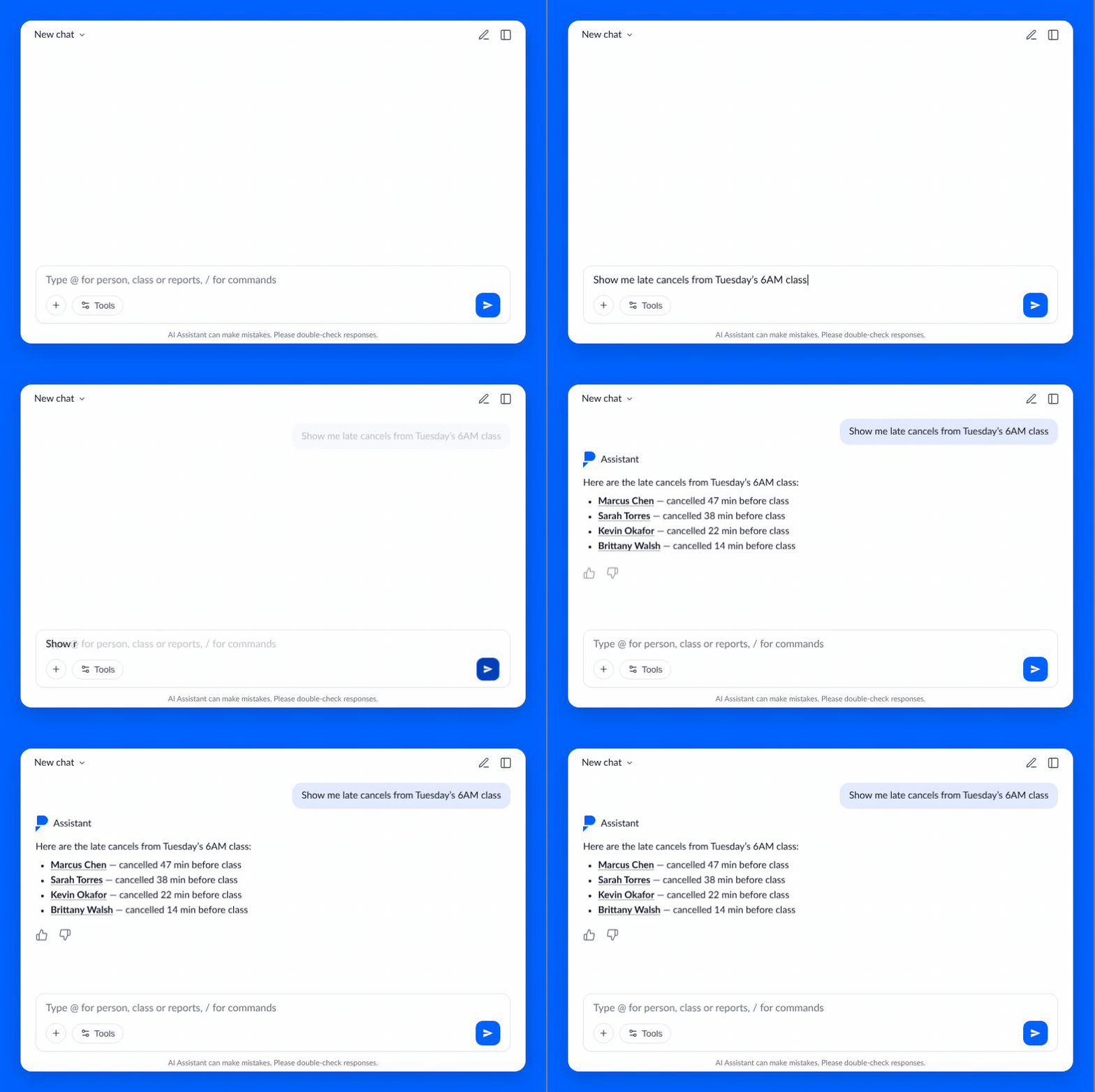
This is the on-ramp. Instead of opening four tabs, scrolling a member profile, or hunting for someone's last visit, you just ask:
- "When was Sarah's last check-in?"
- "What's Mike's email?"
- "Show me late cancels from Tuesday's 6am."
- "What's on the schedule today?"
This is the starting point for most gyms, and it's the front-desk daily driver. Replaces the morning routine clicking through the day view in Core each morning, scanning for no-shows, and bouncing over to leads. One prompt, one answer.
Why it matters
It's not the sexiest level, but it's the one that earns trust. Once an owner see the assistant identify all the late cancels from the previous week in seconds, they start opening it for everything else. Lookups are the gateway drug.
Real gym, real story
James Paoletti, Spectrum Sports NJ, was already using the Assistant when we sat down with him. He runs the tech and AI side of his gym and was excited about it from day one.
What we didn't expect: in the middle of our call, James learned the Assistant could do things he'd assumed weren't possible yet. Add and remove members from class. Apply check-ins. Charge late fees. He'd been working around it, not realizing the lookups he was already running could turn into actions with one more sentence.
That's the Level 1 story in a nutshell: most AI users start narrow. The product opens up the second they realize "can you also..." is a valid question.

Level 2: Insights
Patterns, not just answers.
This is where most users shift from one-off questions to looking at the gym as a system. The prompts get less surgical and more curious:
- "What's my churn rate for the last 3 months?"
- "Who hasn't checked in in the last 30 days?"
- "How many new members did I get each month this year?"
- "Which classes consistently have low attendance?"
You're still mostly asking the Assistant to show you something, but the something is a trend, a cohort, a rate. The same data you used to assemble in a spreadsheet, surfaced in a sentence.
Why it matters
Level 2 is where the Assistant starts replacing real work. The hour you used to spend pulling reports, running VLOOKUPs, or tabbing between Core, a CSV, and a calculator? That collapses into a question.
Real gym, real story
Daniel Egloff, Queen City CrossFit, has a finance background and a self-described "voracious appetite" for this stuff. He's a top 1% user of the Assistant.
His Level 2 win is exactly the kind of thing owners don't realize is possible until they try it:
"I used to run that all through an Excel with a VLOOKUP function. Now it's saving me 20 minutes that I used to spend getting that report."
Same report. Same data. Twenty minutes a week back.
On the other side of the country, James ****from Spectrum Sports ran an attendance pattern query on his sports performance gym and discovered something he didn't know was true:
"40 to 45% of your athletes that were reserved didn't check in for class. Which was awesome for us."
That's not a number that lives anywhere in Core as a single report. It's a pattern that took one prompt to surface, and immediately changed how James thought about his front-desk workflow.

Level 3: Decisions
This is the level. This is where the Assistant earns its keep.
Level 3 is the jump from information to action. From "what's happening" to "what should I do about it."
The prompts sound different:
- "If I needed to cancel a class, which one should it be?"
- "Where do I have demand but not enough capacity?"
- "Who should I be paying attention to right now?"
- "Where am I losing members?"
You're not pulling a list. You're asking your built-in teammate to think with you. The Assistant looks at attendance, payments, churn signals, and capacity at the same time and gives you a prioritized answer you can actually act on.
Why it matters
Most software hands you data and walks away. Level 3 is the moment the Assistant stops being a faster Core and starts being a decision-making partner. It's also the moment owners stop second-guessing the tool and start running plays through it.
Real gym, real story
Glenn Getchell is on the team at Rome SF, where his official role is retention. He'd been using the Assistant daily within a week of getting access. What stood out, in comparison to ChatGPT, which he used daily before, was the context: the PushPress Assistant understood his members, attendance, and gym operations because it was connected directly to the data already living inside PushPress.
His Level 3 moment was small on the surface and big in practice. Glenn asked the Assistant for a list of unlimited-plan members with 7 or fewer check-ins in April. Simple cohort.
Then he took that list, sat down with his co-owner, and ran a working session on it.
That's the move. The Assistant didn't just hand him a CSV. It surfaced exactly the slice of his membership that needed attention, and Glenn turned it into the agenda for a retention conversation that would have otherwise taken hours of prep.
His verdict, on the record:
"I'm on Team PushPress."
Level 4: Strategy
Running the business through it.
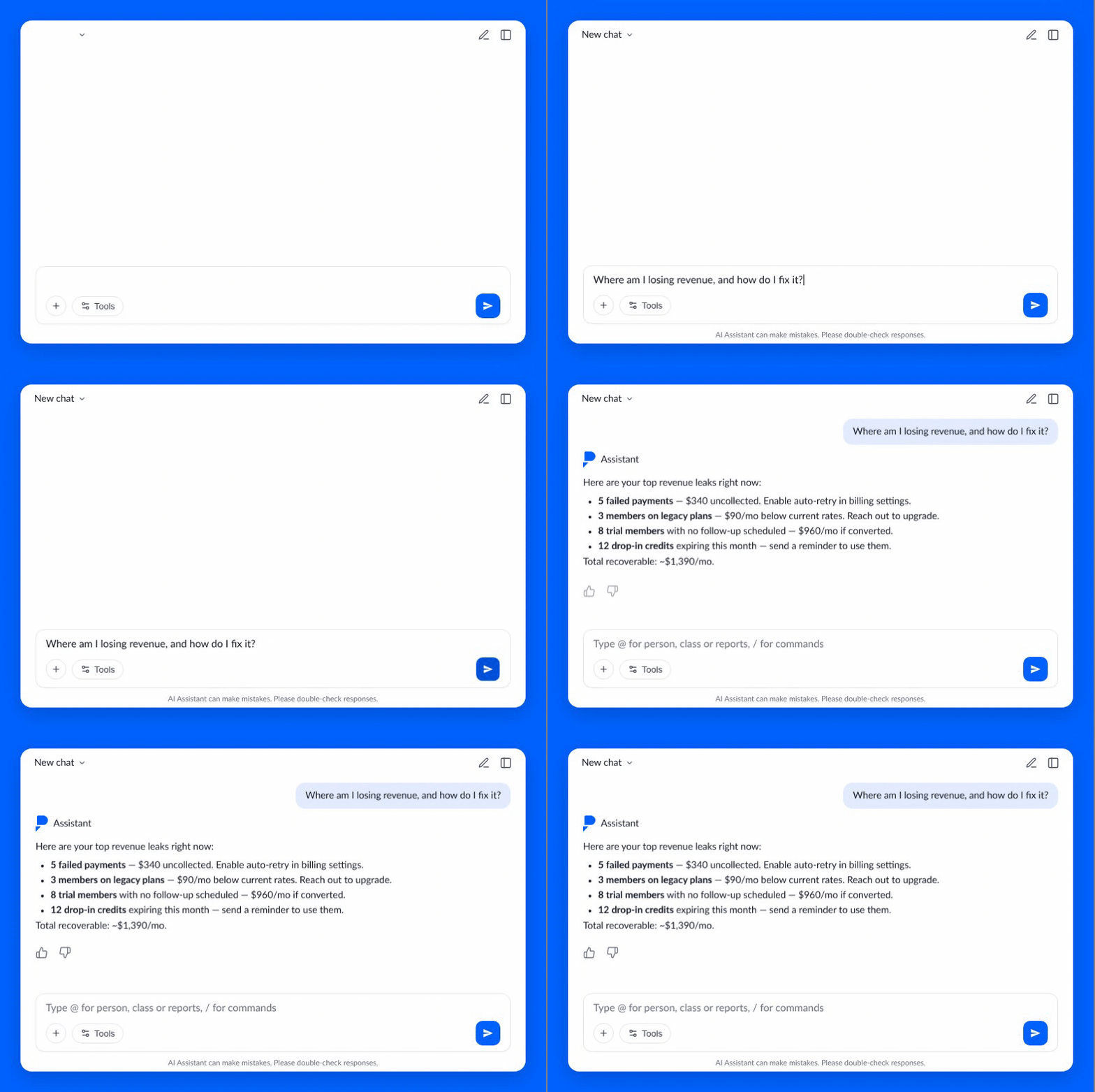
Level 4 happens naturally once an owner trusts the Assistant. The questions get bigger. Less "what" and more "where."
- "What's going on with my gym this week?"
- "Where am I losing revenue, and how do I fix it?"
- "Help me plan next quarter based on attendance trends."
At this point, the Assistant isn't a feature inside Core. It's the way the owner operates Core. The morning starts with a health-of-the-gym pull. The week wraps with a churn and revenue review. Quarterly planning runs through it.
Why it matters
This is the level where owners stop asking "how do I use this?" and start asking "how did I run my gym without it?" The Assistant becomes the connective tissue across every part of the business, from attendance and billing to leads, retention, and class capacity.
Real gym, real story
Ron Hansen, Head Coach at CrossFit EMC, just finished his Google Professional AI certification. He'd been running a fragmented stack: Claude for one thing, Gemini for another, ChatGPT for a third. Three tabs, three workflows, three subscription bills.
When the Assistant landed in Core, Ron pulled it all in. On our call he walked through a live workflow:
- Asked the Assistant for his newest leads.
- Ranked them by signal.
- Moved them into a contact funnel.
- Pushed them into an email campaign for an upcoming workshop.
One Assistant. One platform. Workflow that used to live across four tools, running inside the system that already has all his data.
That's Level 4. Not a faster spreadsheet. Not a smarter search bar. The Assistant becomes the way the gym gets run.
How to climb the ladder
A few patterns from the gyms doing this well:
Open wide before going narrow. Most new users start with one surgical question. Try the opposite: "What's going on with my gym this week?" See the range, then drill down. The big-picture opener is what gets people from Level 1 to Level 3 faster than anything else.
Don't stop at the first answer. Multi-turn is where the value lives. Ask for the number, then ask what it means, then ask who to focus on first. The Assistant carries the thread. Most users hang up too early.
Ask it what to ask. If you don't know where to start, try: "What's the most useful thing I could ask you right now about my gym?" The Assistant surfaces what it knows. Ron calls this his favorite move, and it works at every level.
Ask for direction, not data. This is the whole game. "Show me members who haven't checked in" is a lookup. "Who should I be paying attention to today?" is a decision. Same data underneath. Completely different output.
Where you fit
If you're still living at Level 1, that's fine. Everybody starts there. The goal isn't to skip levels — it's to know they exist, and to keep pushing one rung higher every time you open the Assistant.
The owners who do? They stop running their gyms the same way.
Book a demo and we'll show you what Level 3 looks like on a gym just like yours, usually inside the first 20 minutes.
Frequently asked questions
What is the PushPress AI Assistant?
The AI Assistant is a built-in teammate inside PushPress Core. It knows your members, billing, schedule, attendance, and leads, and can answer questions, surface patterns, or take action (with your confirmation). It's not a chatbot or a support agent. It lives inside the software you already use to run your gym.
What are the 4 levels of using the AI Assistant?
The four levels are Quick Actions, Insights, Decisions, and Strategy. Quick Actions are faster than clicking through Core ("when was Sarah's last check-in?"). Insights surface patterns across attendance, churn, and revenue. Decisions move from "what's happening" to "what should I do about it." Strategy is when the Assistant becomes the way you run the gym week-to-week and quarter-to-quarter.
What's the difference between Level 1 and Level 3?
Level 1 is information — you ask a question, the Assistant returns an answer. Level 3 is direction — you ask the Assistant to help you decide what to do. Same data underneath, completely different output. "Show me members who haven't checked in" is Level 1. "Who should I be paying attention to right now?" is Level 3.
Can the AI Assistant take action in my gym?
Yes. The Assistant can charge a no-show, pause a membership, cancel a plan, book a class, or apply a one-off charge. It always confirms before doing anything is finalized — never one-click. It cannot send emails, texts, or push notifications; the outreach to your members is yours.
How long does it take a gym owner to get to Level 3?
Most owners get to Level 3 within a few weeks of regular use. Level 4 — running the business through the Assistant — happens naturally once they trust it. The fastest way to get there is to open with a big-picture question like "what's going on with my gym this week?" instead of a single narrow lookup, then keep asking follow-ups within the same thread.
What is the AI Assistant not?
It's not a separate tool, not a chatbot, not a support agent, and not a replacement for Core. You don't have to set it up or train it. It works the moment you open Core. Today, the Assistant is built directly into Core and works on desktop or mobile.
Resources for Gym Owners
Playbooks, checklists and on-demand webinars — every one built from an interview with an owner who runs the system.
Ready to scale your fitness business?
Try our hassle-free gym management software loved by thousand of successful gym owners.
PushPress is the reason my gym became profitable.

Glofox Pricing in 2026: What $99 a Month Actually Gets You
Glofox publishes one number: plans starting at $99 a month. Here's what that number covers, what it doesn't, and what PushPress costs in full.
5 Best Software Options for Programming Daily Gym Workouts (2026)
Compare PushPress, Wodify, SugarWOD, btwb, and TrainHeroic for programming daily gym workouts: pricing, affiliate programming, and data integration.
Your Sales Script Has Drifted. Here's How to Retrain Your Team Before January
Nobody abandons the sales process. They lose 5% of it at a time until the close rate drops.
Follow along and build a better gym with us
Get actionable strategies and ideas to help you grow your gym and manage it successfully, in your inbox every week!